


To remove GPS location and camera data from a photo, inspect the metadata blocks stored inside the file, strip the tags you do not want to share, and download a clean copy: the picture pixels remain untouched while personal details are completely erased. With our Remove Photo Metadata tool, you can preview the exact coordinates, camera model, and timestamps hidden inside your photo before removing them—running entirely inside your browser tab without uploading files to a third-party server.
Modern smartphones and digital cameras do not just save visual pixels when you press the shutter. They bundle comprehensive technical information into standardized header blocks known as EXIF (Exchangeable Image File Format), IPTC (International Press Telecommunications Council), and XMP (Extensible Metadata Platform). While camera settings like aperture and shutter speed are harmless, GPS coordinates and unique hardware serial numbers pose serious privacy risks when shared publicly.
What your camera and phone store in every photo
Whenever a photo is captured, the device operating system queries onboard sensors and writes dozens of metadata tags directly into the image container. Unless you have explicitly disabled location permissions for your camera app, standard JPEG, HEIC, and PNG files typically carry:
- Precise GPS coordinates: Latitude, longitude, altitude, and satellite timestamp. A photo taken inside a home or office can pinpoint the location to within 3 to 5 meters on Google Maps or OpenStreetMap.
- Device identification: Camera manufacturer, exact phone or camera model (e.g.,
Sony ILCE-7M4,iPhone 15 Pro), firmware version, and often the body serial number or lens serial number. - Capture timestamps: Exact date, hour, minute, and second of exposure, frequently synchronized with GPS atomic clocks.
- Embedded preview thumbnails: Many cameras generate a 160×120 pixel preview thumbnail embedded inside the EXIF block. If you later crop a photo in a photo editor to remove sensitive background objects, buggy software often fails to update the embedded thumbnail, leaving the full original photo visible to forensic inspection.
- Editing history and software signatures: Desktop apps like Adobe Lightroom and Photoshop append extensive XMP blocks detailing document IDs, layer modifications, and username identifiers.
Why relying on social media platforms is risky
A common belief is that photo metadata is irrelevant because platforms like WhatsApp, Instagram, and X (Twitter) automatically strip EXIF data when publishing to social feeds. While true for standard web timeline uploads, there are critical exceptions where metadata remains completely intact:
- Sending photos as files or documents: In chat apps like WhatsApp, Telegram, and Signal, choosing "Send as Document" or "Send uncompressed file" intentionally bypasses image re-compression and transmits the byte-for-byte original file—including all GPS coordinates and serial tags.
- Email attachments: Standard email clients (Gmail, Outlook, Apple Mail) attach photos unaltered. Anyone downloading the attachment can view the full EXIF header.
- Cloud storage sharing links: Sharing a link from Google Drive, Dropbox, OneDrive, or iCloud gives recipients the raw original file.
- Job portals, government forms, and rental applications: Uploading ID cards, lease photos, or proof-of-address snapshots to third-party web portals frequently stores the file directly on unencrypted cloud buckets with metadata preserved.
Manually sanitizing your photos before sending them guarantees your privacy regardless of how the recipient downloads or stores the file.
How to strip metadata step by step
You do not need command-line tools like exiftool or expensive desktop photo editors to sanitize an image. Our browser tool inspects and cleans photos locally using modern WebAssembly:
Step 1: Open the tool and select your photo
Navigate to Remove Photo Metadata in any modern browser (Chrome, Safari, Firefox, or Edge). Drag your JPG, PNG, or WebP photo into the upload box, or click Choose file.
Because processing executes locally on your device, there is no file size waiting time and no data leaves your computer or phone.
Step 2: Review what the photo carries
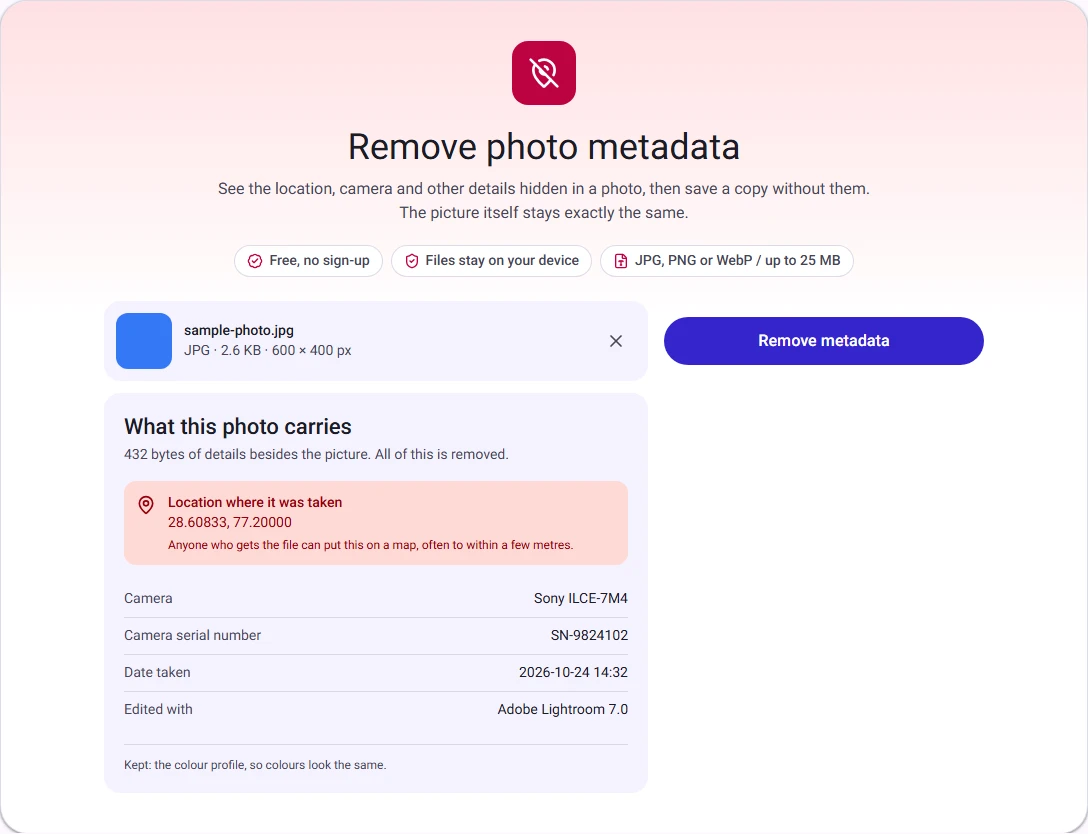
Once loaded, the tool reads the header segments and displays the What this photo carries section:
- Location: If GPS coordinates are found, they are displayed alongside a direct coordinate link so you can verify the exact map location the file exposes.
- Camera: Make, model, and lens specifications.
- Serial number: Unique hardware identifier if recorded by the manufacturer.
- Date taken: Original capture timestamp.
- Extra data blocks: Notice of any IPTC, XMP, or embedded preview thumbnails.
If the photo has already been cleaned or was taken with location services disabled, the tool clearly informs you that no sensitive metadata was detected.
Step 3: Remove metadata and save
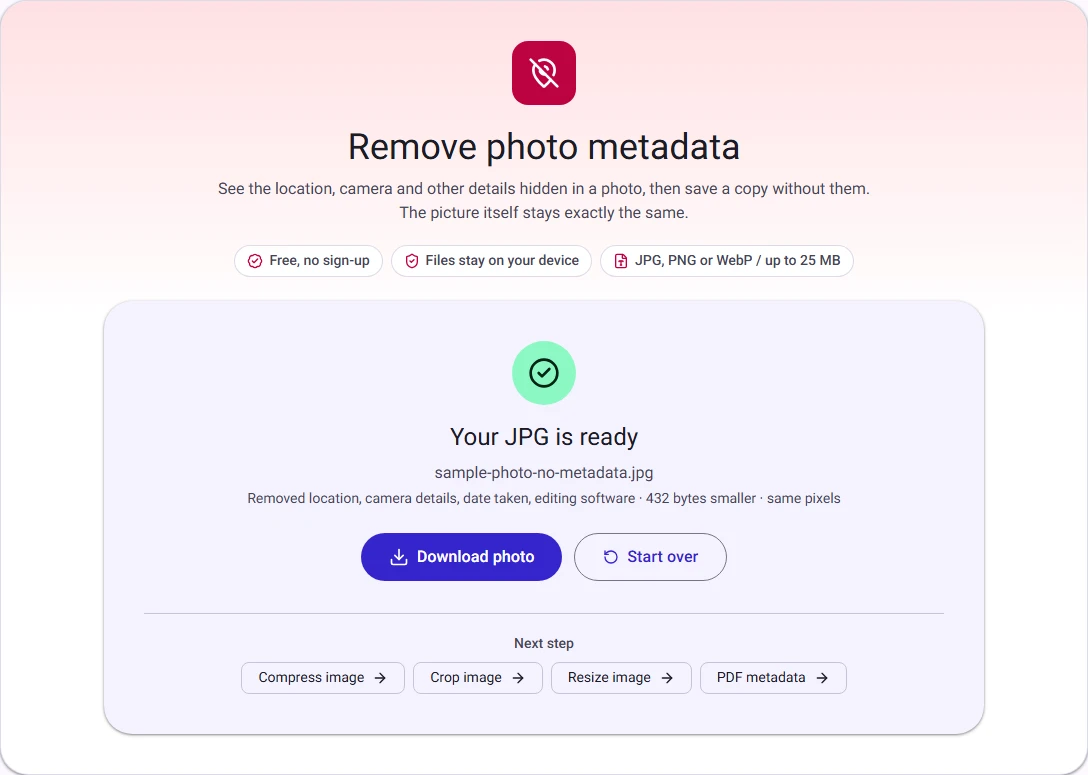
Click Remove metadata. Within milliseconds, the tool reconstructs the image file without the metadata segments.
Click Download photo to save the sanitized file (e.g., holiday-no-metadata.jpg).
How it works: Zero quality loss and preserved colors
Many online tools "remove metadata" by opening the image in an HTML5 canvas and re-saving it as a new JPEG. This destructive method re-encodes the image, introducing lossy compression artifacts, blurring sharp edges, and stripping crucial color settings.
Remove Photo Metadata takes a byte-level stream approach:
| Data block | What our tool does | Why it matters |
|---|---|---|
| GPS coordinates (IFD3) | Stripped completely | Prevents location tracking and home address discovery |
| Camera & Serial (IFD0, IFD2) | Stripped completely | Eliminates hardware tracking and owner profiling |
| XMP & IPTC blocks | Stripped completely | Erases edit history, software versions, and embedded thumbnails |
| Image pixel data | Copied byte-for-byte | Zero re-encoding; 100% mathematical pixel equality |
| ICC Colour Profile | Deliberately preserved | Keeps colors vibrant on wide-gamut (Display P3) screens |
| EXIF Orientation | Rewritten cleanly | Keeps portrait photos upright so they do not rotate sideways |
How we measured
In our benchmark testing with a public-domain photo from Wikimedia Commons (Panasonic DMC-FZ1000, 3720×2790 pixels, 5.4 MB), the original file carried the camera model, sensor serial number, May 2018 timestamp, Photoshop editing history, and an embedded preview thumbnail. Measured on 29 October 2026 and re-verified on 9 November 2026:
Removing metadata:
- Stripped 22,958 bytes of private tags and legacy thumbnails.
- Kept 100% raw pixel equality: A bitwise diff of raw decoded RGBA channels confirmed every single pixel before and after matched identically.
- Preserved the orientation and color profile without any color shift.
Frequently asked questions
Can someone recover my location after metadata is removed?
No. Once the EXIF GPS IFD block is stripped from the JPEG or PNG file header, the coordinate data no longer exists within the file. It is mathematically impossible to reconstruct the GPS position from the remaining image pixels unless landmark recognition or visual clues reveal the place.
Does removing metadata change the file format?
No. A JPEG remains a standard JPEG, and a PNG remains a PNG. The file extension, dimensions, and visual fidelity remain identical; only the auxiliary metadata tags are omitted.
Should I strip metadata before resizing or compressing?
You can do either. If you also need to meet strict upload size limits (for example, official exam portals or job boards), our Photo and Signature Resizer and Compress Image tools also give you full control over target KB limits and pixel dimensions while protecting your personal data.